


How to Fulfill Orders on Shopify?
Order fulfillment is one of the most important parts of running an online eCommerce business, and it can be managed effectively with Shopify. Customers expect fast, reliable, and sometimes free delivery, so online businesses need a clear fulfillment process if they want to keep customers satisfied and avoid operational problems.
The order fulfillment process includes several steps, from receiving an order to preparing, packing, shipping, and updating the customer. For new online retailers, this can feel confusing at first. Shopify helps simplify the process by giving sellers different ways to manage fulfillment directly from the Shopify admin.
If you are a new Shopify seller, understanding how to fulfill orders on Shopify can help you run your store more smoothly, improve customer service, and take your eCommerce business to a higher level.
Different ways to fulfill orders on Shopify
Shopify has become a popular eCommerce platform because it gives sellers useful tools for managing many parts of the sales process, including order fulfillment. The right fulfillment method depends on your business model, products, inventory setup, and shipping strategy.
Shopify allows you to fulfill orders in three main ways:
- Automatic order fulfillment
- Manual order fulfillment
- Partial order fulfillment
After reviewing the needs of your Shopify store, you can choose the fulfillment process that works best for your business.
Fulfill orders on Shopify automatically
Automatic order fulfillment saves you from manually marking each order as fulfilled. When this option is enabled, Shopify can automatically mark eligible orders as fulfilled after the customer completes the purchase.
Automatic fulfillment can be useful when you sell digital products, gift cards, downloads, or products handled by a third-party fulfillment service. It is usually best for products that do not require manual packing, labeling, or shipping from your side.
You can use automatic fulfillment when:
- You sell digital gift cards or digital downloads.
- Your products do not require packing, labeling, or physical shipping.
- The products are not available for pre-order.
- You use a third-party fulfillment service.
Fulfill orders on Shopify manually
Manual order fulfillment is often the best option for retailers who want more control over inventory, packing, shipping, and customer communication. It allows Shopify sellers to review each order before marking it as fulfilled.
With manual fulfillment, you can also send customers an email notification when their order has been shipped. This helps keep buyers informed and improves the overall customer experience.
Manual fulfillment can also be used to fulfill multiple orders at the same time. If your store has multiple inventory locations, Shopify allows you to configure location priorities and choose where products should be fulfilled from.
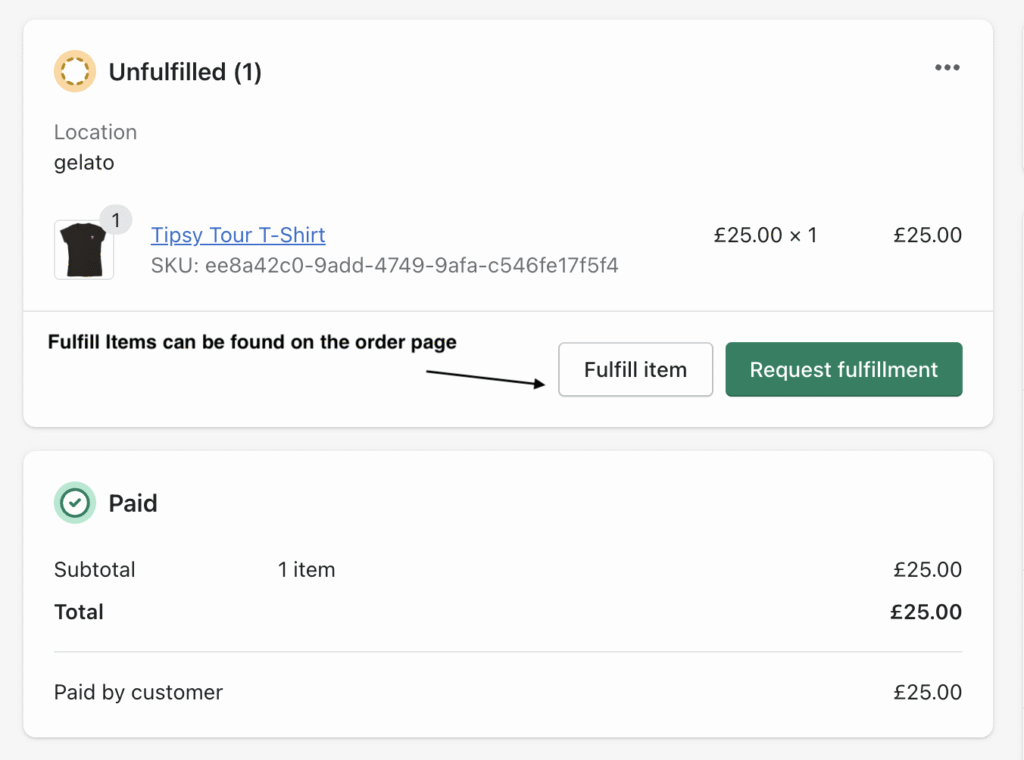
Steps to fulfill an entire order
Before fulfilling orders manually, make sure you have not selected the option to automatically fulfill orders in your checkout settings.
1. Open Orders: From your Shopify admin, go to Orders.
2. Select the order: Choose the order you want to fulfill. It should have the status Unfulfilled.
3. Change the location if needed: If you use multiple locations or want to change the fulfillment location, click Change location and save your update.
4. Create a shipping label if needed: If you use Shopify Shipping, click Create shipping label to buy and print a label.
5. Add tracking information: If you use a carrier outside Shopify Shipping, select Mark as fulfilled, enter the tracking number, and add the shipping carrier details.
6. Fulfill the items: Click Fulfill items to mark the order as fulfilled.
7. Buy the shipping label: If you are using Shopify Shipping, select a shipping service and click Buy shipping label.
Partial order fulfillment on Shopify
Partial order fulfillment is useful when a customer orders multiple items, but one or more products are out of stock, delayed, or available for pre-order. Instead of waiting until every item is ready, you can fulfill part of the order and ship the remaining items later.
To fulfill only part of an order, make sure automatic fulfillment is disabled in your checkout settings.
Steps to partially fulfill an order without Shopify Shipping
1. Open Orders: From your Shopify admin, go to Orders.
2. Select the order: Choose the unfulfilled order you want to partially fulfill.
3. Change the location if needed: If you use multiple locations or need to change the fulfillment location, update the location and save it.
4. Mark the order as fulfilled: Select Mark as fulfilled.
5. Adjust the product quantity: On the fulfillment page, change the quantity of the products you want to fulfill now.
6. Add tracking information: In the tracking information section, enter the tracking number and shipping provider details.
7. Notify the customer if needed: Select the option to send shipment details to the customer if you want them to receive a shipping update.
8. Fulfill the selected items: Click Fulfill items. The order page will then show which items are fulfilled and which items remain unfulfilled.
Steps to partially fulfill an order with Shopify Shipping
1. Open Orders: From your Shopify admin, go to Orders.
2. Select the order: Choose the unfulfilled order you want to process.
3. Create a shipping label: Click Create shipping label.
4. Adjust the product quantity: On the fulfillment page, change the quantity of the products you want to fulfill.
5. Choose a shipping method: In the shipping service section, select the shipping method you want to use.
6. Notify the customer if needed: Choose whether to send shipment details to the customer.
7. Buy the shipping label: Click Buy shipping label. Shopify will update the order page to show which items have been fulfilled and which remain unfulfilled.
Tips for improving your order fulfillment process on Shopify
A smoother fulfillment process can help you deliver products faster, reduce mistakes, and improve customer satisfaction.
- Use automation where possible, such as barcode scanners or fulfillment software.
- Estimate shipping volumes accurately and build good relationships with your shipping providers.
- Double-check products before shipping to make sure they match the customer’s order.
- Improve inventory management so you know what is available and where it is stored.
- Use multiple locations or retail locations when they can help you fulfill orders faster.
The bottom line
Order fulfillment should be a top priority for any eCommerce business owner. A strong fulfillment process can help improve customer service, reduce errors, support business growth, and deliver products faster.
Shopify gives sellers several ways to manage fulfillment, including automatic, manual, and partial order fulfillment. By choosing the right method for your store, you can streamline your ordering and Shopify shipping process.